Webstore Operations
WATCH THE VIDEO
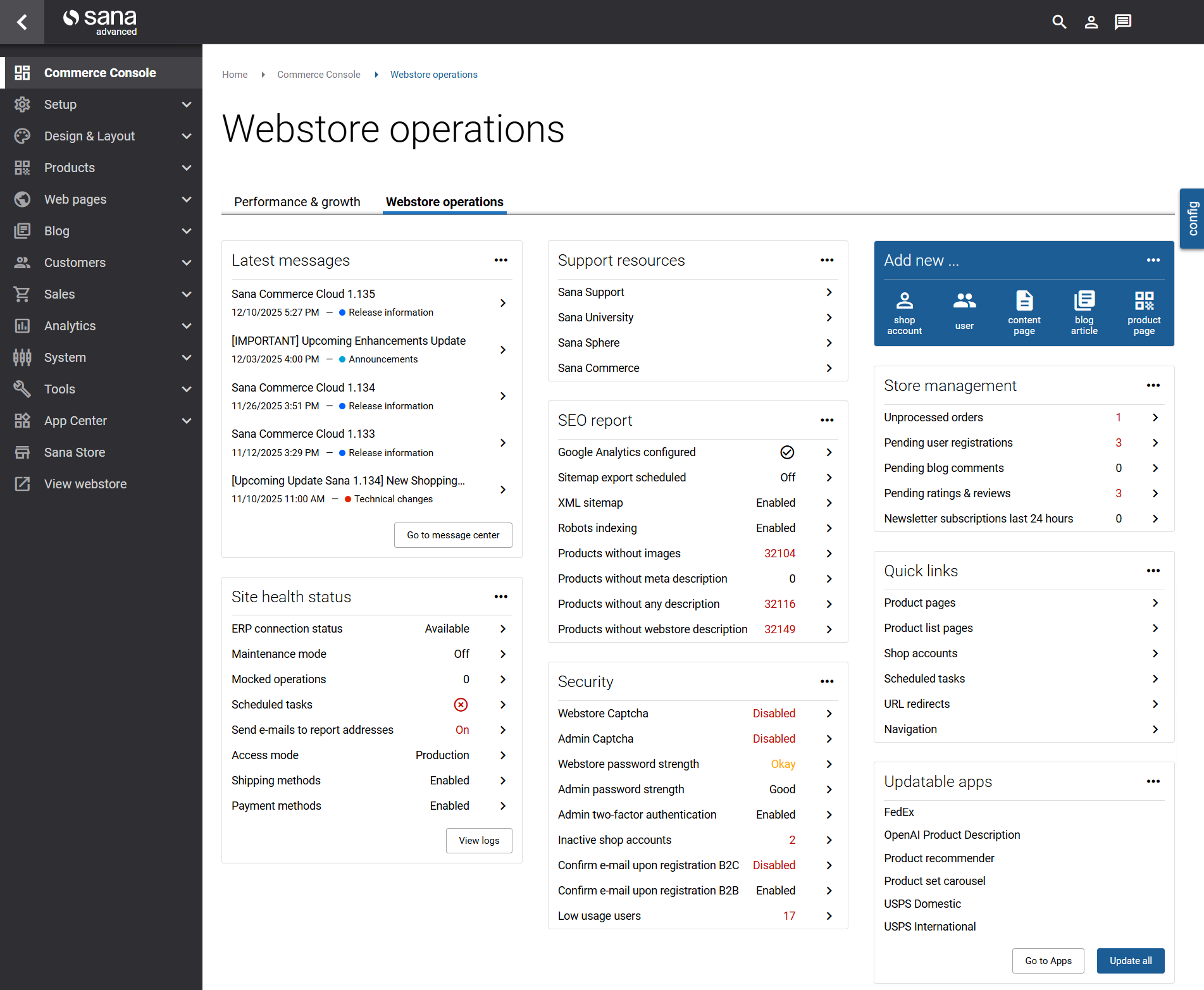
Webstore operations is a built-in part of Commerce Console, available alongside the Performance & growth. It is designed to give Sana Admin users a practical, day-to-day overview of everything happening in their webstore. While Performance & growth focuses on strategic business metrics, this page focuses on operational visibility: what needs attention now, what’s working smoothly, and where you may need to take action to keep your store running optimally.
This page consists of a collection of customizable widgets. Each widget highlights a specific area of the webstore, such as security checks, SEO reports, unprocessed orders, pending customer registrations, product ratings, reviews, or blog comments. Many widgets also provide direct links to the relevant locations in Sana Admin, enabling quick navigation and efficient workflow. It is designed so that the most commonly used parts of Sana Admin, such as editing product and content pages or checking unprocessed orders, are accessible directly from your homepage.
Because webstore operations vary from business to business, the dashboard is fully flexible. You can rearrange widgets using drag-and-drop, remove ones you don’t need, or disable specific checks. This ensures that the dashboard reflects your operational priorities and that your team is always seeing the information that matters most.
If you have made any changes to the webstore operation widgets and want to revert them to their default state, click config and then Revert to default.
Widgets
Site Health Status
This widget displays the “big picture” of your webstore’s health as a whole, for example you can check the ERP connection status, if the maintenance mode is enabled or not, view the webstore access mode, scheduled tasks completion status, etc. Clicking on the View logs button opens the Logs page where you can monitor the work of your webstore.
Security
Using this widget, you monitor Sana Admin and webstore for security issues such as if Google reCAPTCHA is enabled or not, how strong are the webstore and Sana Admin passwords, how many inactive shop accounts there are in Sana.
Support Resources
This widget gives you quick access to the support resources Sana Commerce provides. You can visit Sana Online Help to find release notes, in-depth documentation and learning guides. Visiting Sana University you can immerse yourself in Sana Commerce Cloud online trainings, experience the product at first hand and try our guided sessions of your Sana webstore and various product features. Also, you can access Sana Sphere to create a support ticket and the official Sana Commerce Cloud website.
SEO Report
This widget shows the SEO analysis to help identify problems that can be holding your Sana webstore back from its potential. You can see a list of recommendations to check and improve, for example if Google Analytics is configured for your webstore, whether indexing and sitemap are configured to make your webstore and various web pages to be crawled and indexed by search engine robots. Using the widget, you can also view the number of products without images and meta data.
Store Management
This widget gives you a real-time analysis about unprocessed orders, pending user registrations, blog comments, product ratings and reviews, etc.
Quick Links
This widget gives you quick access to the product and product list pages, shop accounts, scheduled tasks, etc. You can easily edit the Quick links widget – you can add the links you use most frequently and delete those you use rarely.
Updatable Apps
This widget shows a list of apps for which a new version is available. Clicking on the Go to Apps page opens the Apps page. You can see the list of all apps, install an app, configure, enable and disable, update, if there is a new version, and remove, if you no longer need it. Clicking on the Update all button, you can update all apps to the latest version at once.
Add New…
This widget provides quick access to the most frequently used features, such as creating a new shop account, a new Sana Admin user, new content pages and blog articles, and editing product pages.
Create Widgets
Widgets are the core components that make up the Webstore operations page. You can create your own links and text widgets on the Webstore operations page. Links widgets are used to add links to the pages in Sana Admin which are most frequently used, as well as links to the external websites you often visit. Text widgets are used to write texts, labels, some instructions, reminders, display a simple plain text message and other useful information. You can add one or more widgets to the Webstore operations page.
Create Links Widget
Step 1: To create a links widget, on the Webstore operations page, click config.
Step 2: Click Links widget.
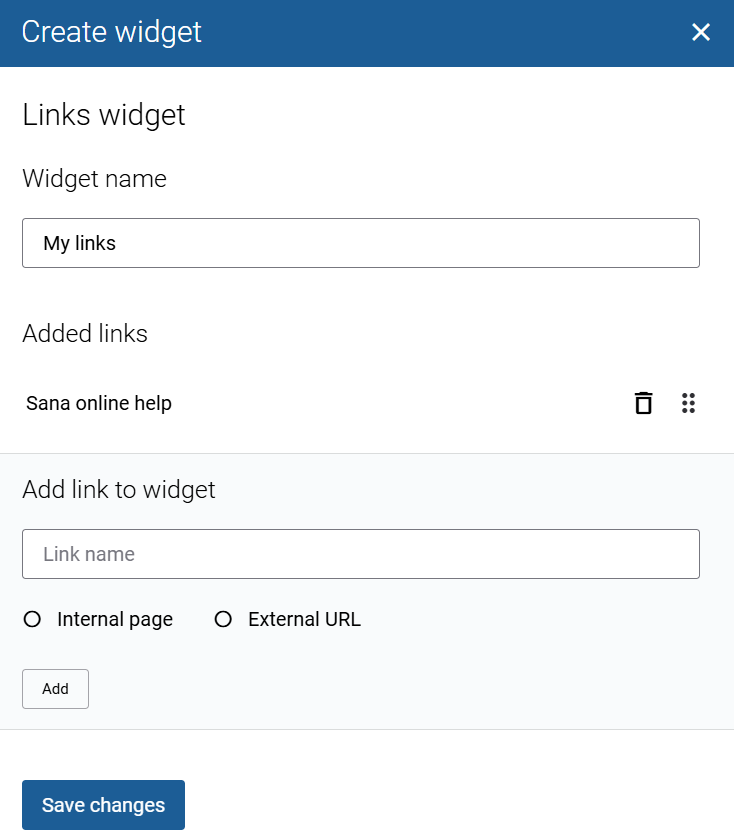
Step 3: In the Widget name field, enter the name of your widget.
Step 4: Enter the link name. Link the internal page or external URL. To link the internal page, you can search for it by title or URL.
Step 5: Click Add. You can add as many links in the widget as you need. Once the links are added, click Save changes.
Create Text Widget
Step 1: To create a text widget, on the Webstore operations page, click config.
Step 2: Click Text widget.
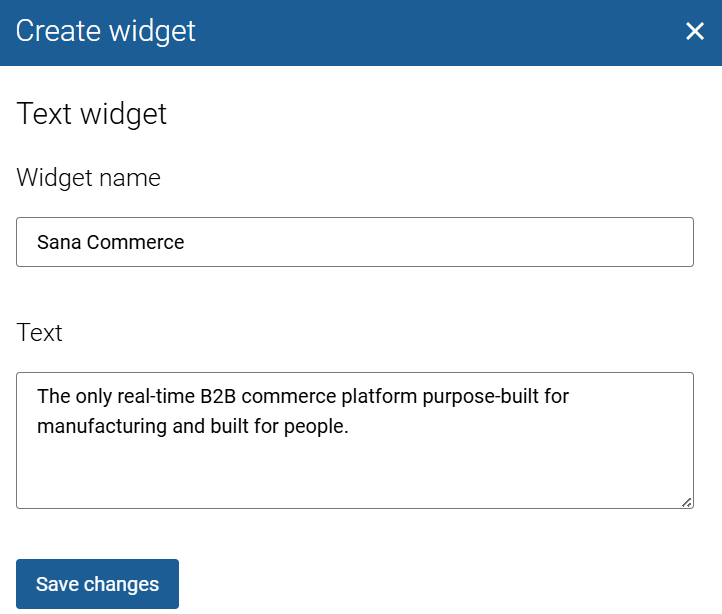
Step 3: In the Widget name field, enter the name of your widget.
Step 4: Enter the necessary text.
Step 5: Once the text is added, click Save changes.


