Sales Agreements
A sales agreement is a contract between a customer and a merchant that defines special pricing conditions – such as discounts or committed quantities. These agreements allow customers to benefit from better prices, but only within a certain timeframe. The widget makes those opportunities visible and easy to track.
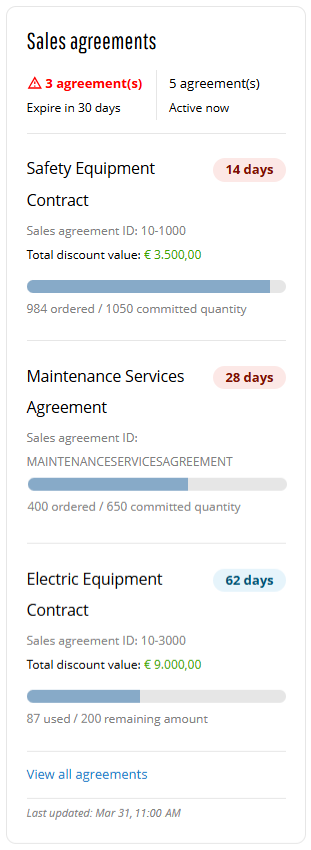
The Sales agreements widget in the Sana webstore helps buyers stay in control of their negotiated contracts by displaying key agreement information directly on the My account dashboard page. Instead of tracking sales agreements manually or relying on offline communication, customers can instantly see which agreements are active, how much has already been ordered, and what remains.
With clear visibility into sales agreement progress and upcoming expirations, customers can plan purchases more effectively and ensure they fully benefit from negotiated terms. By highlighting upcoming deadlines and showing how much of an agreement has already been used, the Sales agreements widget encourages customers to make the most of their agreed pricing before it expires. For sellers, this transparency encourages better agreement utilization while fostering stronger, trust-based commercial relationships.
It complements two other parts of Sana’s sales agreements functionality:
-
ERP-based sales agreements: The underlying feature that lets B2B customers order against contracts negotiated in your ERP, with special pricing and discounts applied automatically.
-
The seller-facing sales agreements widget: A Commerce Console widget in Sana Admin that gives sellers visibility into the health of their customers’ sales agreements. It surfaces agreements that need attention – because they are expiring soon, being under-used, or going quiet − so your team can step in before revenue is lost.
Key Features
-
Sales agreement overview: Provide customers with a clear summary of active sales agreements directly on the My account page, including a sales agreement name, ID, and status. This way, customers can quickly understand which agreements are currently in place.
-
Commitment progress tracking: Display ordered versus committed quantities or values using a visual progress bar, helping customers quickly see how much of their agreement has been used and how much remains.
-
Expiration awareness: Highlight sales agreements that are nearing expiration with clear countdown timelines, helping customers to take timely action and avoid losing negotiated benefits.
-
Agreement insights and navigation: Display key sales agreement details such as total discount value and provide quick access to the full sales agreements overview for deeper insights when needed.
Key Benefits for Customers
-
Maximize agreement value: Give customers clear insight into how much of their committed quantities or values have been used and what remains, helping them fully benefit from negotiated terms and avoid leaving contractual value unused.
-
Plan purchases with confidence: Clear visibility into sales agreement progress and upcoming expirations helps customers make informed purchasing decisions and ensures they can meet their commitments before sales agreements expire.
-
Greater purchasing independence: Provide self-service access to the sales agreement data directly on the My account page in the Sana webstore, reducing reliance on manual tracking or support teams.
Key Benefits for Sellers
-
Increase agreement utilization: When customers clearly see their commitments and remaining quantities, they are more likely to complete their sales agreements. This helps sellers maximize the value of negotiated contracts and reduce unused commitments.
-
Stronger commercial transparency: Shared visibility into sales agreement status and progress reduces misunderstandings and creates more transparent and trusted relationships with customers.
-
Lower operational overhead: Reduce the need for manual tracking and customer inquiries by enabling customers to monitor sales agreements independently, allowing your teams to focus on higher-value commercial activities.
Adding the Widget
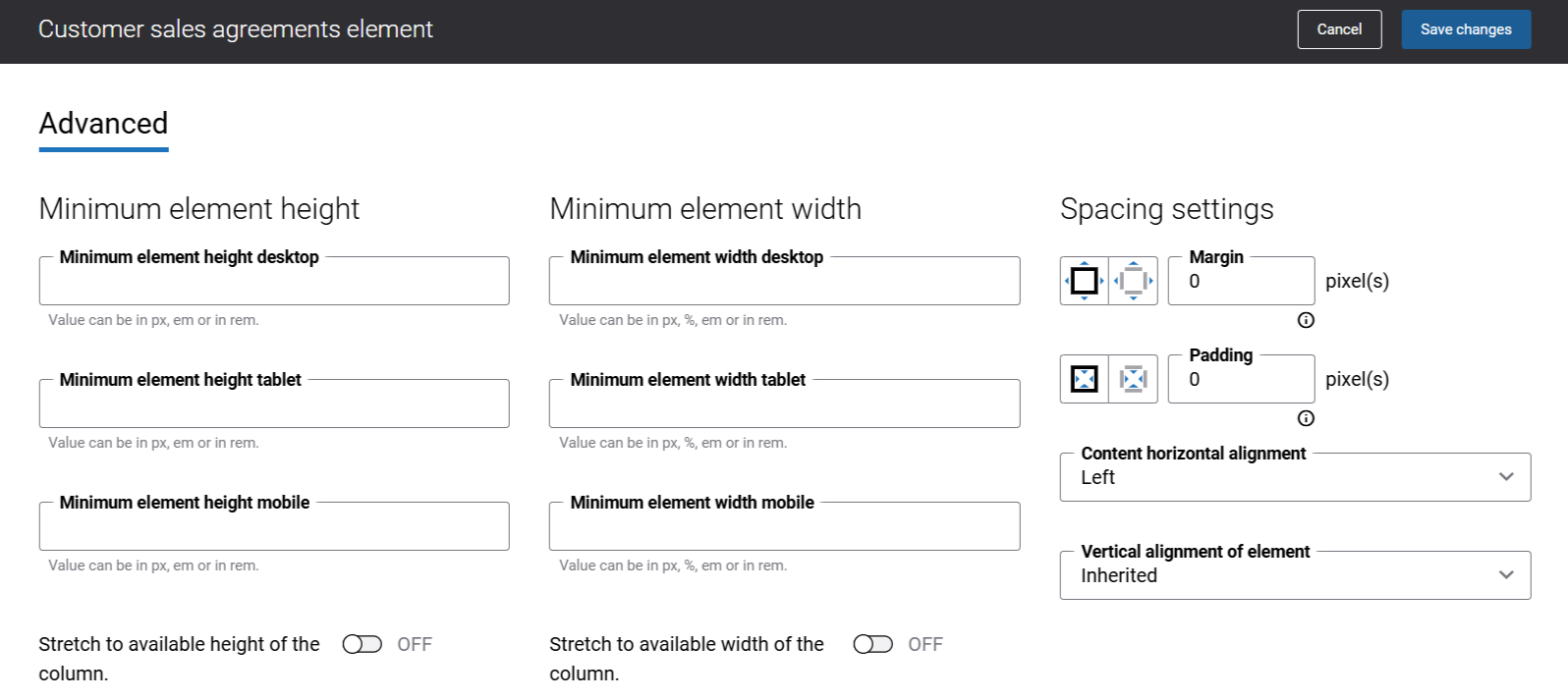
To add the Sales agreements widget to any page of the Sana webstore, use the Customer sales agreements content element in Sana Admin. You can add this widget to any page. However, we recommend placing it on the My Account page or on any other dedicated page.
There are no specific content element settings. On the Advanced tab, you can configure height, width, and spacing settings. For more information about advanced settings, see Content Elements.
What Customers See
-
The information in the Sales agreements widget is visible only to B2B customers who are logged in to the Sana webstore.
-
Sales agents can see the sales agreements information in the Sales agreements widget only for the represented customer. If a sales agent does not represent any customer, the widget displays a message indicating that no account is represented.
-
A last updated date showing when the sales agreements data in the Sales agreements widget was most recently refreshed, helping customers understand how current the information is. For more information, see Last Updated Date in Buyer Widgets.
-
The Sales agreements widget shows up to 3 sales agreements.
-
Sales agreements are sorted by:
- Days until expiration (soonest first).
- If multiple agreements expire on the same day, those with higher usage (more fulfilled) are shown first.
-
The total number of currently active sales agreements.
-
The number of agreements that will expire within 30 days, highlighted in red to emphasize urgency.
-
In the Sales agreements widget, customers can click on the sales agreement title and open the sales agreement details.
-
The link View all sales agreements that redirects to the Sales agreements overview page with all available sales agreements for the customer.
-
Each sales agreement includes key information to help customers understand its status and usage:
- A sales agreement title (if no title is available, the sales agreement ID is shown)
- A sales agreement ID
- Days until expiration:
- Agreements expiring within 30 days are shown in red (urgent).
- Agreements with more than 30 days remaining are shown in blue.
- 0 days are shown when a sales agreement expires today.
-
The progress bar shows how much of the sales agreement has been used compared to its usage limits or committed quantities.
Sales Agreement Details
Depending on the sales agreement type, different sales agreement details can be shown in the Sales agreements widget.
For example:
-
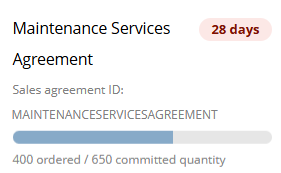
Quantity-based sales agreements are based on a customer’s commitment to purchase a specified quantity of products.
-
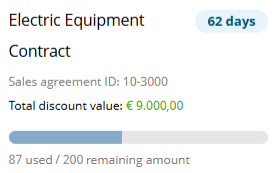
Amount-based sales agreements are based on a customer’s commitment to purchase products for a specified monetary amount.
Data that can be shown in the Sales agreements widget:
- Committed quantity: The total number of units agreed (for example, 650 units).
- Ordered quantity: How many units have already been purchased (for example, 400 units out of 650).
- Total discount value: The maximum savings available under the sales agreement. This value is fixed and does not change based on the sales agreement usage. It is calculated by comparing standard prices with sales agreement prices.
- How much of the sales agreement has been used, and what remains.
- Progress bar visualizes ordered versus committed quantity or amount.
Data Availability
The Sales agreements widget behavior depends on data availability and system conditions:
-
Insufficient data: If a customer has no sales agreements, in the Sales agreements widget, customers will see a message indicating that no sales agreement information is available for the account. Also, customers see a link to the Contact us page.
-
Server errors or ERP connection issues: If the connection between Sana Commerce Cloud and the ERP system is temporarily unavailable and the webstore is in maintenance mode, customers will see no sales agreement data available.
A Reload button can be shown, allowing customers to refresh the data once the ERP connection is restored. This button does not always appear. If the issue is more serious than a temporary ERP connection loss, the button might not show up at all.


