Quick Reorder
The Quick reorder widget is used to help customers quickly reorder products based on their recent purchase activity. It brings frequently purchased, recently purchased, and order-related products into one centralized space, allowing customers to instantly access the products they buy most often and reorder them in just a few clicks.
Instead of navigating through order history or searching for products individually, customers can review relevant products, specify quantities, and add them directly to the shopping cart – all from one place. This streamlined experience simplifies routine purchasing, saves time, and makes repeated orders significantly more efficient.
Key Features
-
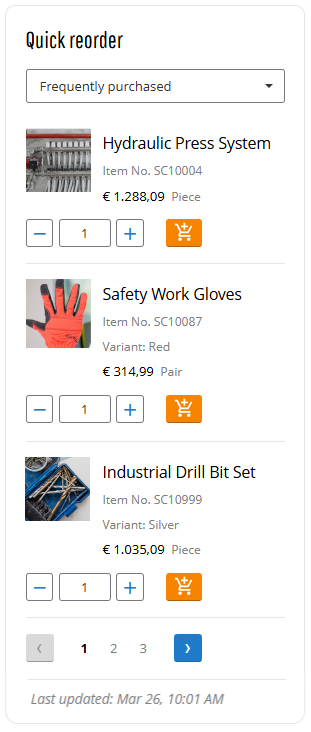
Behavior-based product selection: Surface relevant products based on customer purchasing behavior, including frequently purchased, recently purchased, and order-related products.
-
Centralized reorder view: Display key product information such as a product title, number, image, price, product variant, and unit of measure – in one widget, allowing customers to review reorder options at a glance.
-
Inline quantity editing: Allow customers to specify quantities directly in the widget using the quantity selector.
-
Direct add-to-cart: Enable customers to add products to the shopping cart directly from the widget, reducing the number of steps in the repeat ordering process.
Key Benefits for Customers
-
Faster ordering: Enable customers to reorder the products they purchase most often in just a few clicks. By reducing the time required for repeat purchases, the Quick reorder widget makes routine ordering faster and easier.
-
Personalized experience: Surface products based on each customer’s purchasing behavior, including frequently purchased, recently purchased, and order-related items – making the reorder journey more relevant and actionable.
-
Control and convenience: Provide a centralized space where customers can review products, specify quantities, and decide what to reorder. With greater visibility and flexibility, recurring orders become easier to manage with confidence.
Key Benefits for Sellers
-
More repeat revenue: Simplify reordering to reduce friction in the purchasing journey and encourage more recurring purchases online.
-
Stronger digital adoption: Offer customers a faster, more convenient self-service experience for routine purchases. As reordering becomes easier online, customers are more likely to return to the webstore instead of relying on manual support.
-
Higher customer retention: Deliver a smoother, more relevant reorder experience that helps customers save time and stay in control. When repeat purchasing is easy and reliable, customer satisfaction increases, and long-term relationships are strengthened.
Quick Reorder Data
The Quick reorder widget analyzes a customer’s 10 most recent orders and extracts order lines (products) from them. Based on the selected filter in the widget, it presents a list of products that customers are most likely to reorder. If a customer has fewer than 10 orders, the widget uses all products from the previous orders to generate product suggestions.
A maximum of 9 products is displayed in the Quick reorder widget. Products are organized using pagination: 3 pages with up to 3 products each.
Adding the Widget
To add the Quick reorder widget to any page of the Sana webstore, use the Customer quick reorder content element in Sana Admin. You can add this widget to any page. However, we recommend placing it on the My Account page or on any other dedicated page.
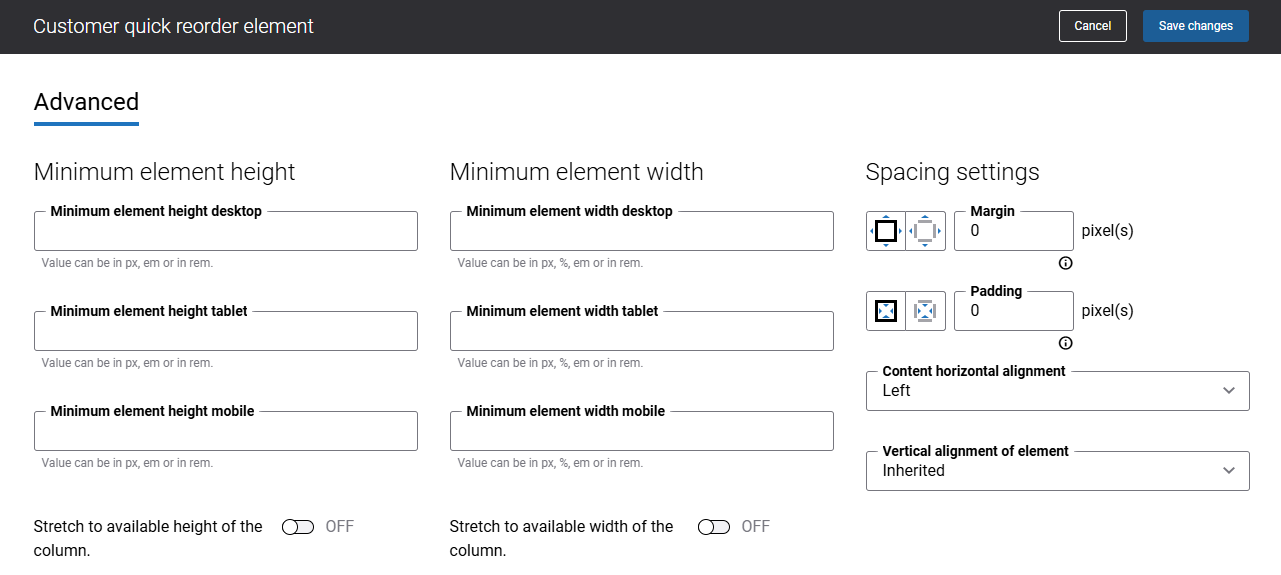
There are no specific content element settings. On the Advanced tab, you can configure height, width, and spacing settings. For more information about advanced settings, see Content Elements.
What Customers See
The Quick reorder widget enhances customer experience by simplifying repeated purchases by giving customers fast access to relevant products based on their order history, reducing time and effort in the purchasing process. It allows buyers to quickly find and reorder items without navigating through the full catalog.
-
The information in the Quick reorder widget is visible only to customers who are logged in to the Sana webstore.
-
Sales agents can see the product information in the Quick reorder widget only for the represented customer. If a sales agent does not represent any customer, the widget displays a message indicating that no account is represented.
-
A last updated date showing when the product data in the Quick reorder widget was most recently refreshed, helping customers understand how current the information is. For more information see Last Updated Date in Buyer Widgets.
Using the Quick reorder widget, customers can:
-
Add products directly to the shopping cart.
-
Specify the quantity needed.
-
Navigate to the product details page.
-
View product information, including product variants, unit of measure, and product price. The product variant and unit of measure are shown exactly as they were in the original order and can’t be changed in the widget. If a customer wants to order the same product in a different variant or unit of measure, they will need to open the product page and choose the desired options there.
Quick Reorder Filter Options
Customers can choose how products are displayed using filter options in the Quick reorder widget.
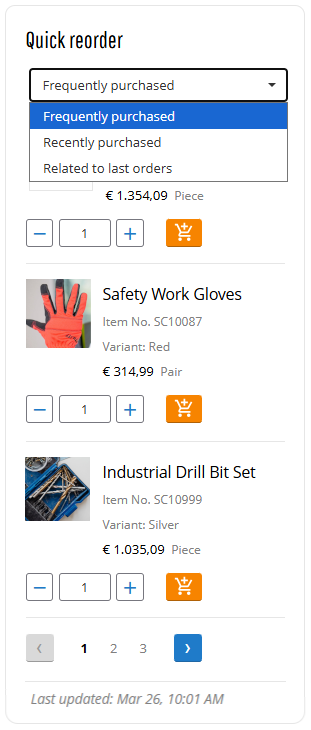
The following options are available:
-
Frequently purchased: Displays products that the customer orders most often, based on their last 10 orders. Products that appear more frequently in these orders will be shown in the widget, making it easy for customers to reorder their regular products.
-
Recently purchased: Displays products from the customer’s most recent orders – starts with products from the latest order and includes all products from it, continues with products from previous orders until the list is filled.
-
Related to last orders: Displays products related to those the customer has purchased in their last 10 orders. Instead of displaying the products previously ordered, the widget presents their related products. Related products are shown using the default unit of measure. Products are shown in the widget only if related products have been configured in the ERP system for products from the customer’s last ten orders.
Limitations
The following product types are not shown in the Quick reorder widget:
- Configurable products in the e-Con product configurator.
- Supplementary or free products.
Data Availability
The Quick reorder widget behavior depends on data availability and system conditions:
-
Insufficient order history: If a customer has fewer than 10 orders, the Quick reorder widget uses only the available orders.
-
No related products: When the Related to last orders option is selected, and no related products are available, the widget displays a message informing customers that there are no products to show.
-
New customers: If a customer has no previous orders, the widget displays a message encouraging them to place an order. Customers will also see a link to the webstore’s home page, encouraging them to place an order to receive product suggestions.
-
Ordering restrictions: If a customer is not allowed to order products in the Sana webstore (on the Shop accounts page, see the Can order products setting in Sana Admin), the Quick reorder widget is not available.
-
Multi-location stock: The products displayed in the Quick reorder widget are specific to the selected location. When customers change their location, the widget updates to display only the products available at the newly selected location.
-
Server errors or ERP connection issues: If the connection between Sana Commerce Cloud and the ERP system is temporarily unavailable and the webstore is in maintenance mode, customers will see no products available for quick reorder.
A Reload button can be shown, allowing customers to refresh the data once the ERP connection is restored. This button does not always appear. If the issue is more serious than a temporary ERP connection loss, the button might not show up at all.


