What’s New in Sana for SAP S/4HANA
Release date: January 2, 2026
Sana ERP Connector Version: 140
Learn about new features, improvements, and bug fixes in this release.
What's New
Sales Document Line Extra Fields
In Sana Commerce Cloud 1.118, we introduced the ability to control the visibility of sales document line fields. At that time, webstore administrators could only manage the visibility of a default set of fields depending on the sales document, such as Item No., Title, Status, Shipment date, Price, Quantity, UOM, Quantity shipped, Quantity invoiced, and Outstanding quantity. However, other sales document fields from the ERP system couldn’t be added to the sales document lines in the Sana webstore.
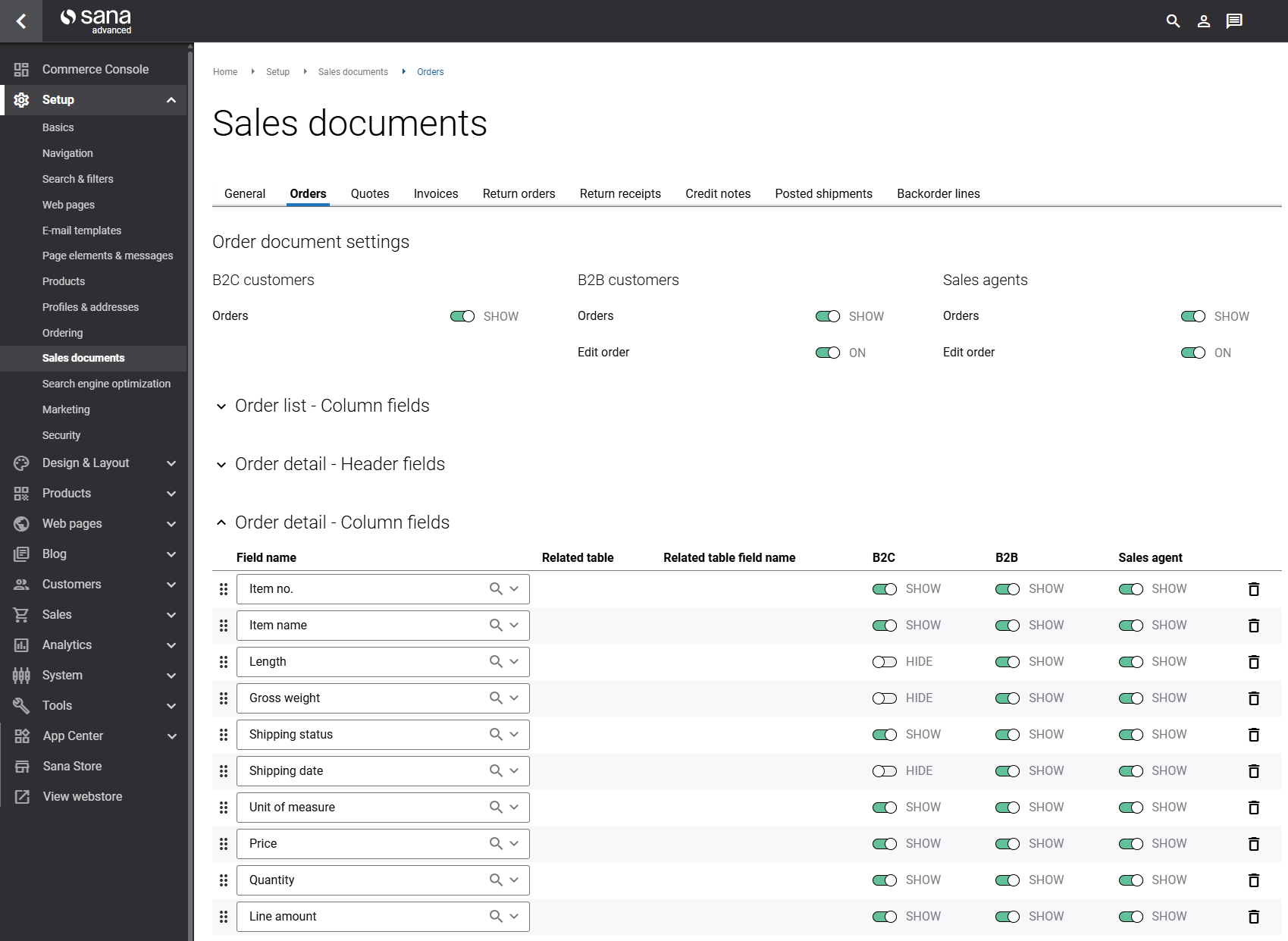
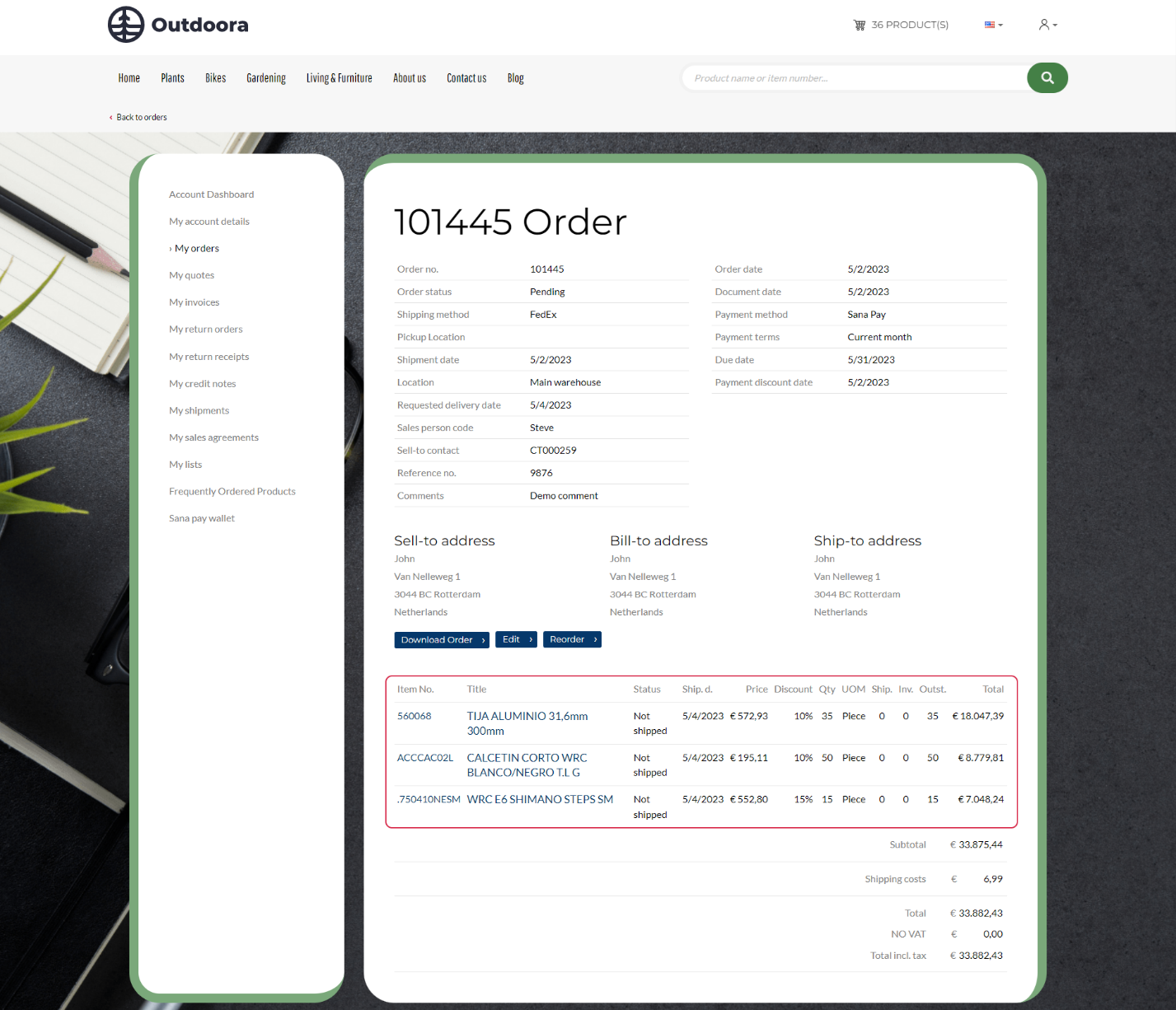
With this new Sana release for SAP S/4HANA, that has changed. Webstore administrators can now add additional ERP fields to the sales document lines, allowing them to modify the sales document details shown in the Sana webstore to better fit their business needs.
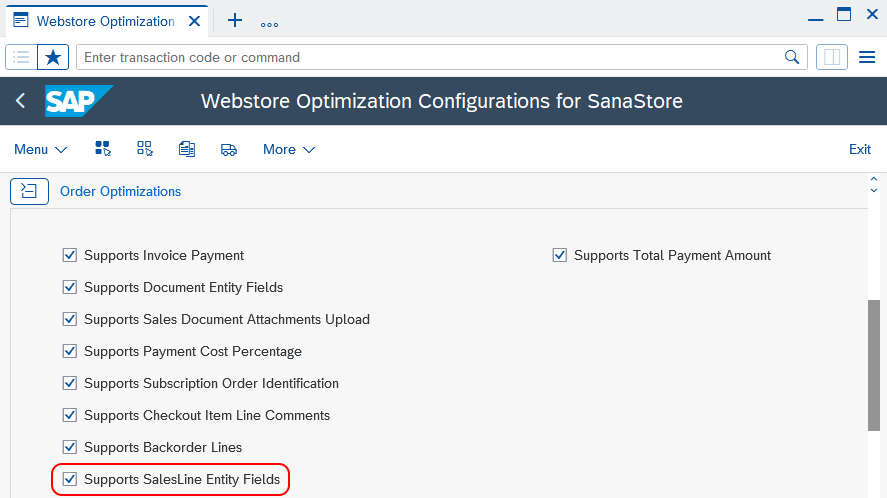
To display specific fields in the Sana webstore, you must first enable this functionality in the Webstore Optimization window of the Sana connector in SAP S/4HANA.
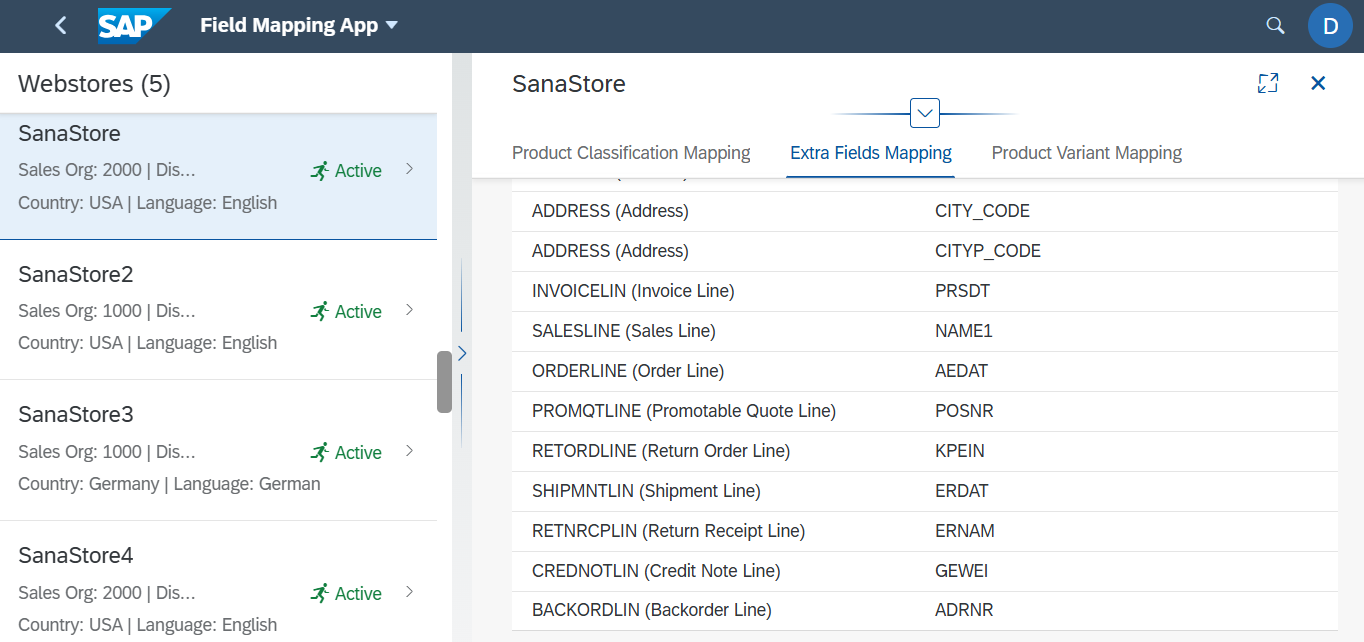
You must also map the necessary fields in the Field Mapping Sana app, on the Extra Fields Mapping tab, in the SAP Fiori Launchpad. We have added new master data types there to support sales document lines with additional fields.
Note that this feature also requires Sana Commerce Cloud 1.124 or later.
Tax Number Formats
Tax number is the unique number that identifies a taxable person or business that is registered for tax.
We have added support for country-specific tax number formats in SAP S/4HANA.
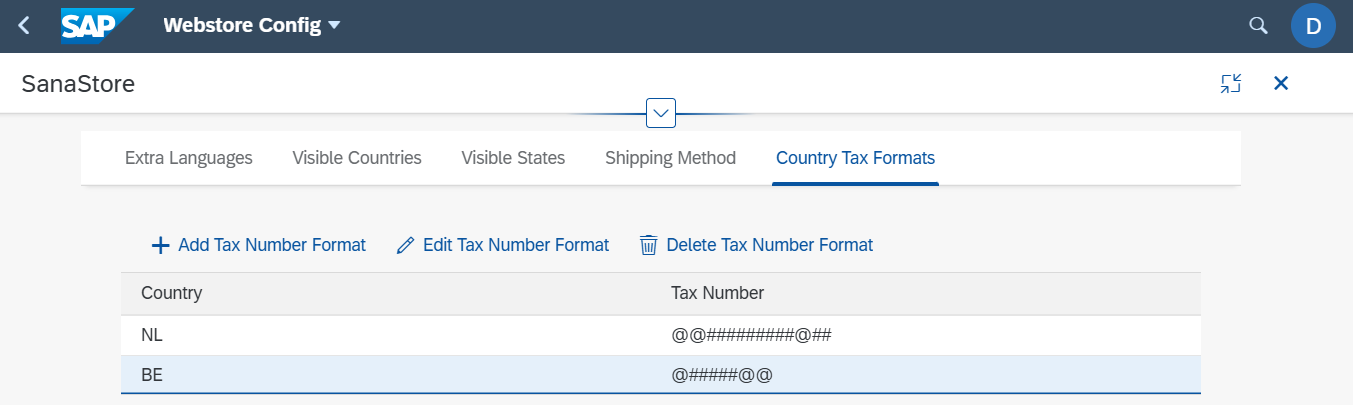
This means that tax numbers entered by customers during registration, checkout, or by a sales agent creating a new prospect are now automatically validated against the correct format based on the selected country.
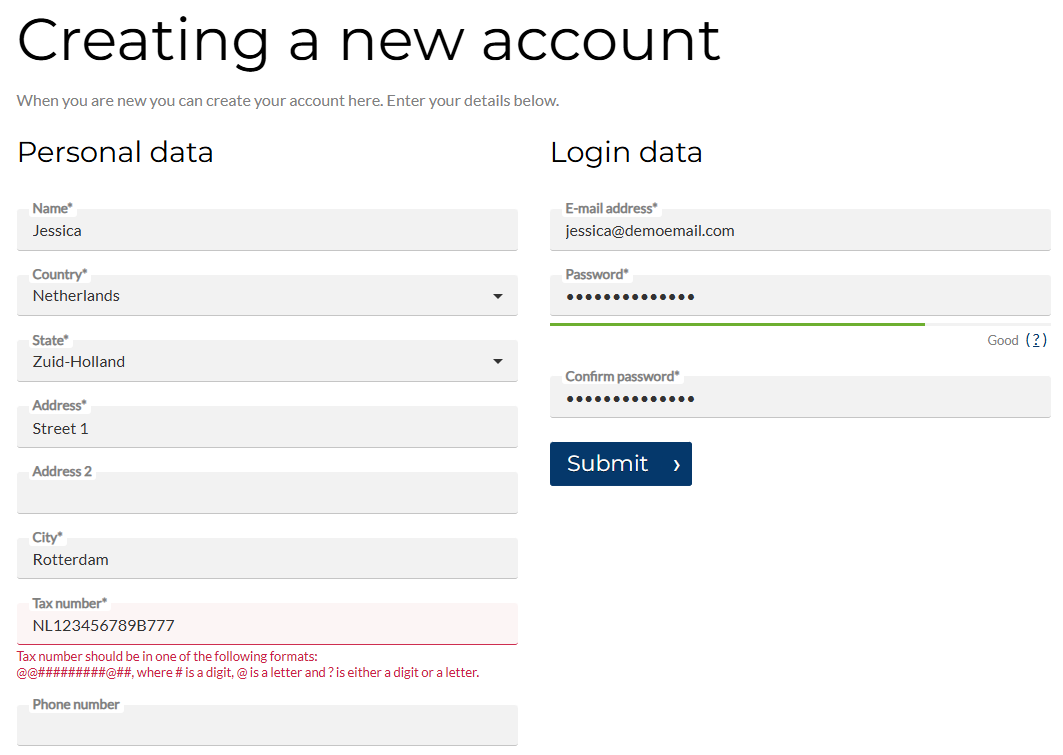
Benefits:
-
Ensures accuracy of tax number entries, reducing errors.
-
Saves time for both customers and merchants by catching formatting issues early.
-
Supports compliance with local tax regulations.
-
Improves data quality in SAP S/4HANA, enabling smoother order processing and invoicing.
This update enhances customer experience and streamlines financial operations for accountants, making tax-related workflows more reliable and efficient.
Plants and Storage Locations: Addresses
A small enhancement has been made to improve how addresses are handled in the multi-location stock functionality. If a storage location does not have its own address specified, the system will now automatically use the address of the plant to which that storage location belongs.
Sana Commerce Cloud relies on the storage location’s address for certain features. However, in many businesses, these addresses are not filled in within the SAP system. To ensure consistency and avoid issues, Sana Commerce Cloud will now fall back to using the plant’s address when the storage location’s address is missing.
Free Goods: Parent Material
We’ve enhanced free goods by specifying to which material they belong. Free goods are extra materials added to the shopping cart automatically when a certain material is purchased, or as a bonus. These materials cannot be removed or edited by customers in the shopping cart.
As a result, the free goods will now be visually grouped with their parent material in the shopping cart, checkout, and order confirmation e-mails, providing a clearer and more intuitive experience for customers, because earlier free goods were always displayed at the end of the list in the shopping cart. Now, they appear directly below their associated parent material.
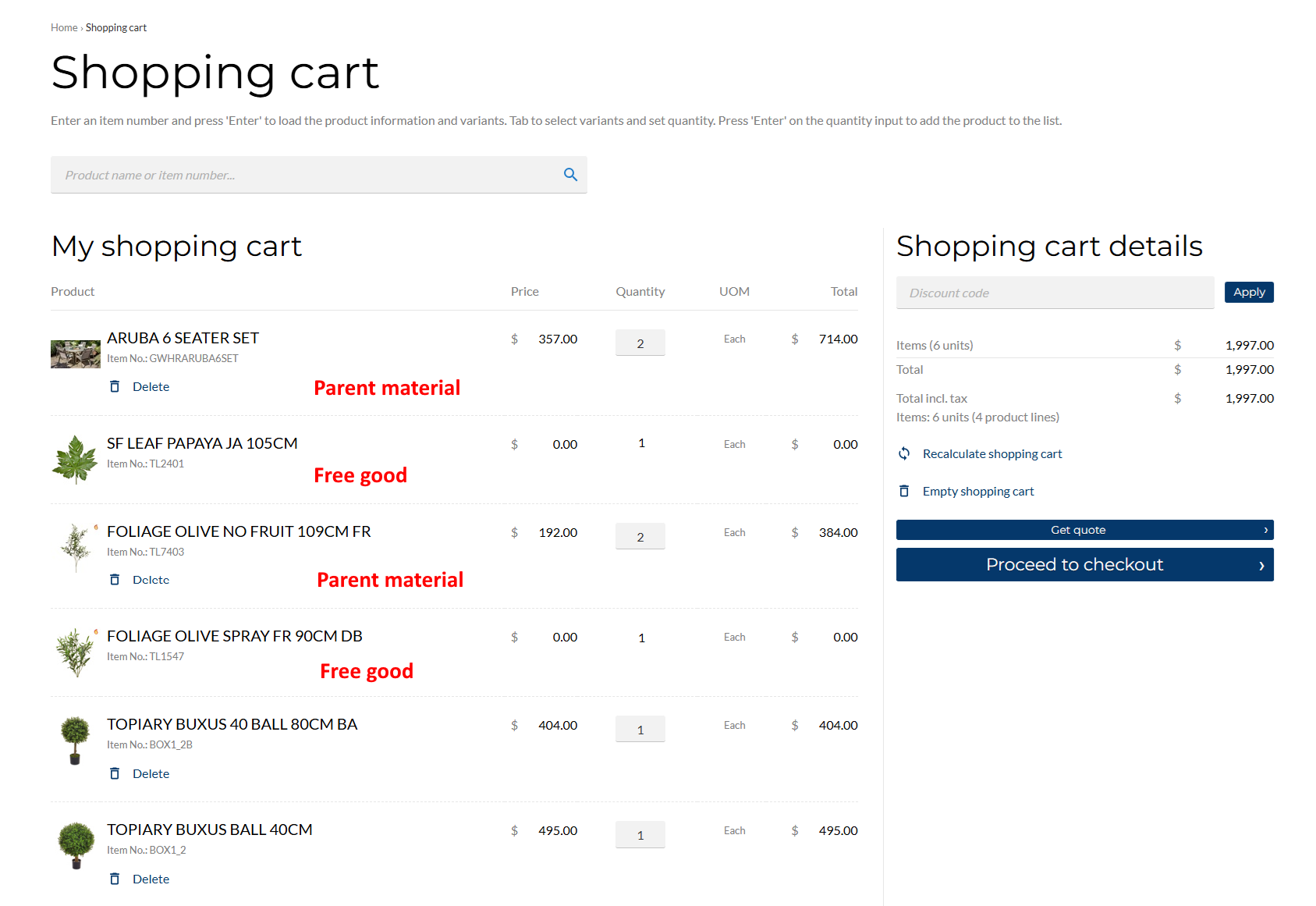
In the order overview at checkout, there is no horizontal separator between the parent material and the free goods that are linked together.
Filter Contacts Based on Customer Account Group
Previously, the system did not verify whether the contacts sent from SAP S/4HANA to Sana were linked to customers relevant to the webstore. As a result, some invalid or irrelevant contacts were indexed by Sana Commerce Cloud.
While the system already checks which contacts are assigned to which customers, an additional improvement has been made - SAP S/4HANA now only returns contacts linked to customers that are relevant for the Sana webstore, based on the customer account group configured in the webstore settings in SAP S/4HANA.
Other Changes
-
Fields mapping: Changed the logic where no fields were returned to Sana Commerce Cloud if entity fields were not mapped in SAP S/4HANA. The logic has been updated so that when fields are not mapped, all entity fields are now returned to Sana Commerce Cloud.
-
Guest checkout: When buyers place an order without registration (guests), their e-mail address is now checked in SAP S/4HANA. If a customer of a guest type with the same e-mail already exists, the system will reuse that record instead of creating a new one. This prevents duplicate guest accounts and helps keep customer data clean.
Previously, in Sana for SAP S/4HANA, this validation didn’t work as intended - SAP S/4HANA didn’t check whether a customer of a guest type with the same e-mail already existed. This behavior has now been fixed, and the process works as expected. -
Product availability dates: The calculation of product quantities in open purchase orders and production orders has been improved. Previously, open order lines with past dates were incorrectly included. These lines are now excluded, and only lines with current and future dates are considered.
Additionally, confirmed planned orders were not previously factored into product quantity and availability date calculations. They are now included to ensure more accurate product availability results.
Bug Fixes
Below you will find a list of key bugs fixed in this release. We have not included every bug fix, focusing instead on the most critical ones.
-
Fixed an issue in the Catalog Overview Fiori app where changing the value of the Visibility or Pre-Orderability toggle changed the value of the other toggle as well.
-
Fixed several issues in the Catalog Overview Fiori app where materials could not be correctly filtered or sorted.
-
Fixed an issue in the Catalog Overview Fiori app where the Non Orderable Reason was not displayed for blocked materials.
-
Fixed an issue in the Webstore Catalog Overview window in SAP GUI where Total Stock Qty. appeared as 0 and Last Date/Time Modified was empty for materials, while the same data was displayed correctly in SAP Fiori.
-
Fixed an issue in the Customer Overview Fiori app where showing or hiding prices including tax for a customer range caused an error.
-
Fixed an issue in the Attachment Overview Fiori app where changing visibility for a material range caused a warning.
-
Fixed an issue where a material price changed during the checkout process after applying a discount from Sana Admin.
-
Fixed an issue in the Webstore Config Fiori app where changes to checkbox settings were saved automatically even after cancelling the changes.
-
Fixed an issue when editing a quote where adding another material to an existing quote caused its price to be shown as 0.
-
Fixed an issue where a payment discount was not calculated during checkout.
-
Fixed an issue with stock calculation for LUMF materials where the total stock did not match the stock across multiple locations.
-
Fixed an issue with filtering materials on the Backorder lines page in the Sana webstore.
-
Fixed an issue with correctly saving the customer name and address 2 during registration.
-
Fixed an issue where multiple base price conditions were mapped in the Webstore Config Fiori app but only the first one was used.
-
Fixed an issue where phone number, fax, and email were not saved from the Sana webstore to a business partner in SAP S/4HANA.
-
Fixed an issue where product variant translations were not returned from SAP S/4HANA to Sana, causing them not to appear in the webstore.
-
Fixed an issue with saving an order with a simple product and a product variant in a single order.
-
Fixed an issue where, if a shopping cart contained one valid product and one invalid product, recalculating the cart removed both products instead of keeping the valid one.
-
Fixed an issue where converting a quote to an order with special prices caused the prices to revert to the standard material prices.
-
Fixed an issue in the Webstore Config Fiori app where the same country could be added multiple times on the Visible Countries tab.
-
Fixed an issue where stock was displayed incorrectly in the shopping cart when the same material was added multiple times, for example, with a different variant or UOM.
-
Fixed an issue with UOM level price conversion in the shopping cart for LUMF BOM materials.
-
Fixed an issue with filtering shipment documents on the Shipments history page in the Sana webstore.
-
Fixed an issue where a quote containing the same material with different UOMs or variants showed stock only for the first line and could not be converted to an order.
-
Fixed an issue where the Prices Including Tax value was ignored when saving or updating a customer account.


