What’s New in Sana for Microsoft Dynamics NAV
Release date: September 24, 2025
Sana ERP Connector Version: 10.0.129
What's New
Multi-Agreement Orders
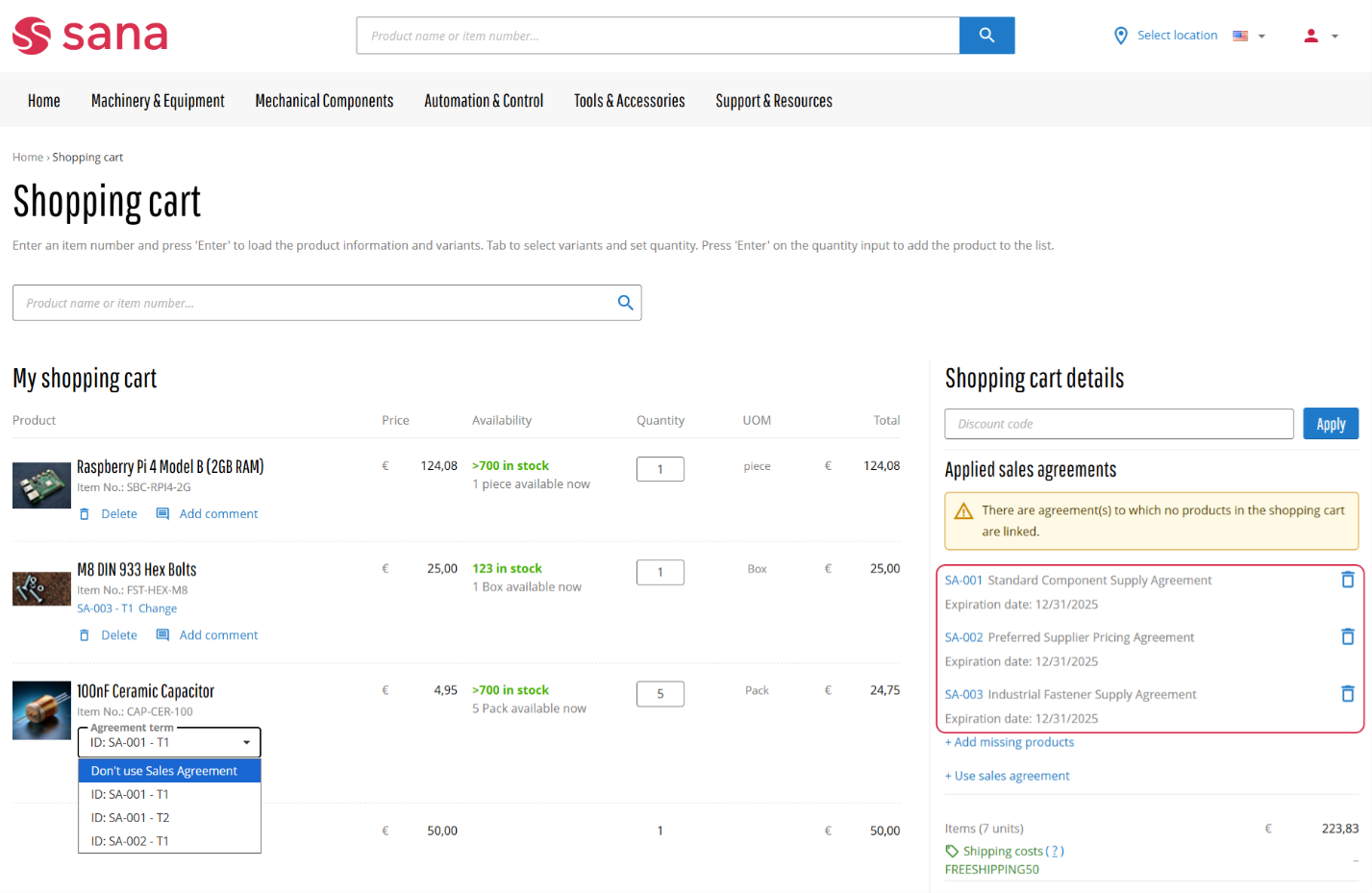
We’ve improved the sales agreement functionality in Sana Commerce Cloud for Microsoft Dynamics NAV. Previously, customers could only apply one sales agreement per order. With this release, customers can now create a single order that includes products linked to multiple blanket sales orders. This change streamlines the purchasing process, allowing customers to apply all relevant agreements in one seamless checkout flow, ensuring correct prices and terms without the need for multiple orders or offline communication.
Key Benefits
-
Unified order processing: Apply multiple sales agreements in a single order.
-
Smart agreement selection: Easily select agreements on product pages or in the shopping cart.
-
ERP-synced contracts: Automatically align agreements with your ERP system to reduce errors and administrative workload. See which agreements are applied to each order line directly in Microsoft Dynamics NAV.
This feature streamlines the purchasing experience, saves time, and reduces manual effort for both buyers and businesses.
To use multiple sales agreements per order, you must have Sana Commerce Cloud 1.131 or later.
Sales Document Line Extra Fields
In Sana Commerce Cloud 1.118, we introduced the ability to control the visibility of sales document line fields. At that time, webstore administrators could only manage the visibility of a default set of fields depending on the sales document, such as Item No., Title, Status, Shipment date, Price, Quantity, UOM, Quantity shipped, Quantity invoiced, and Outstanding quantity. However, other sales document fields from the ERP system couldn’t be added to the sales document lines in the Sana webstore.
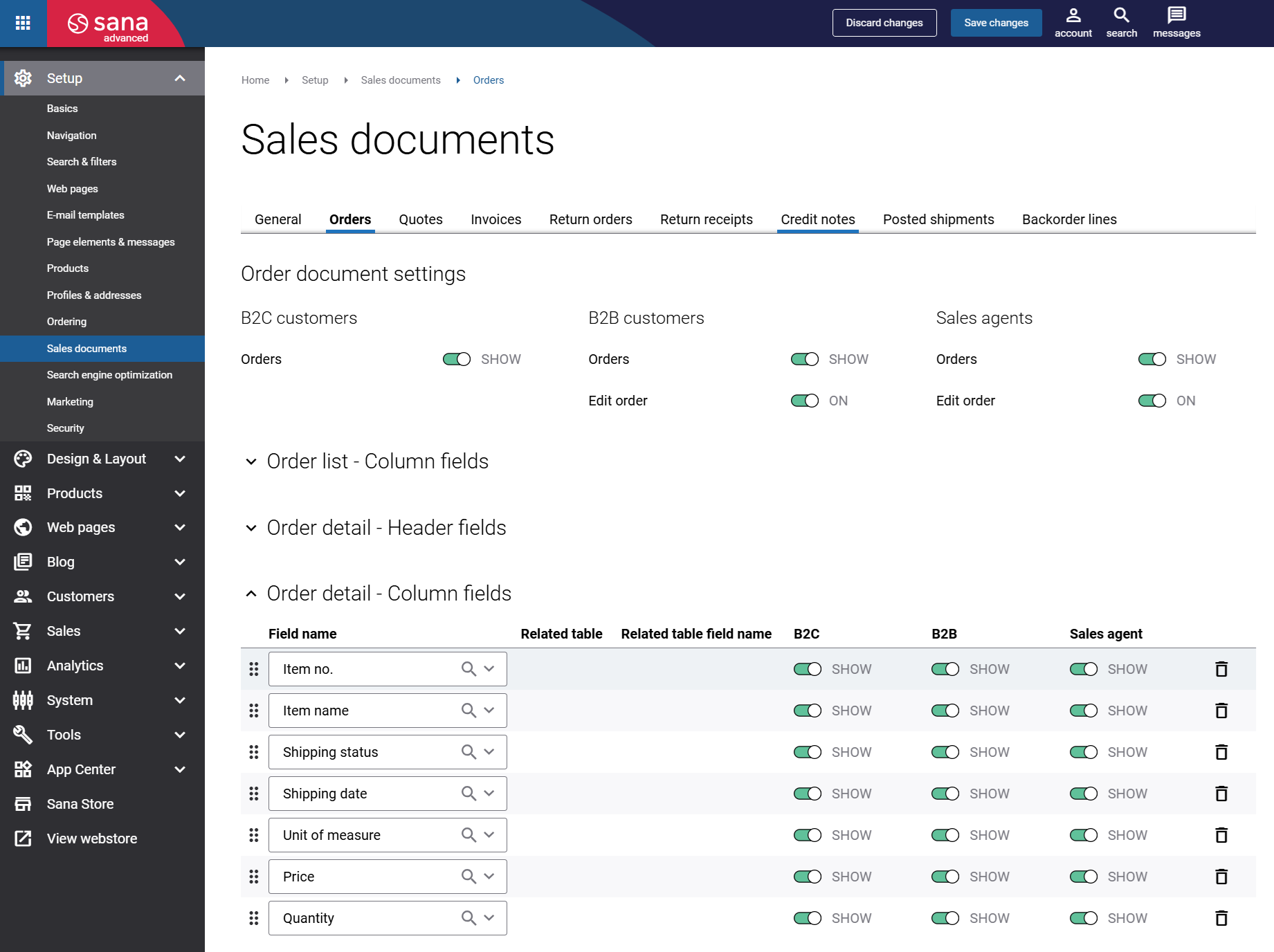
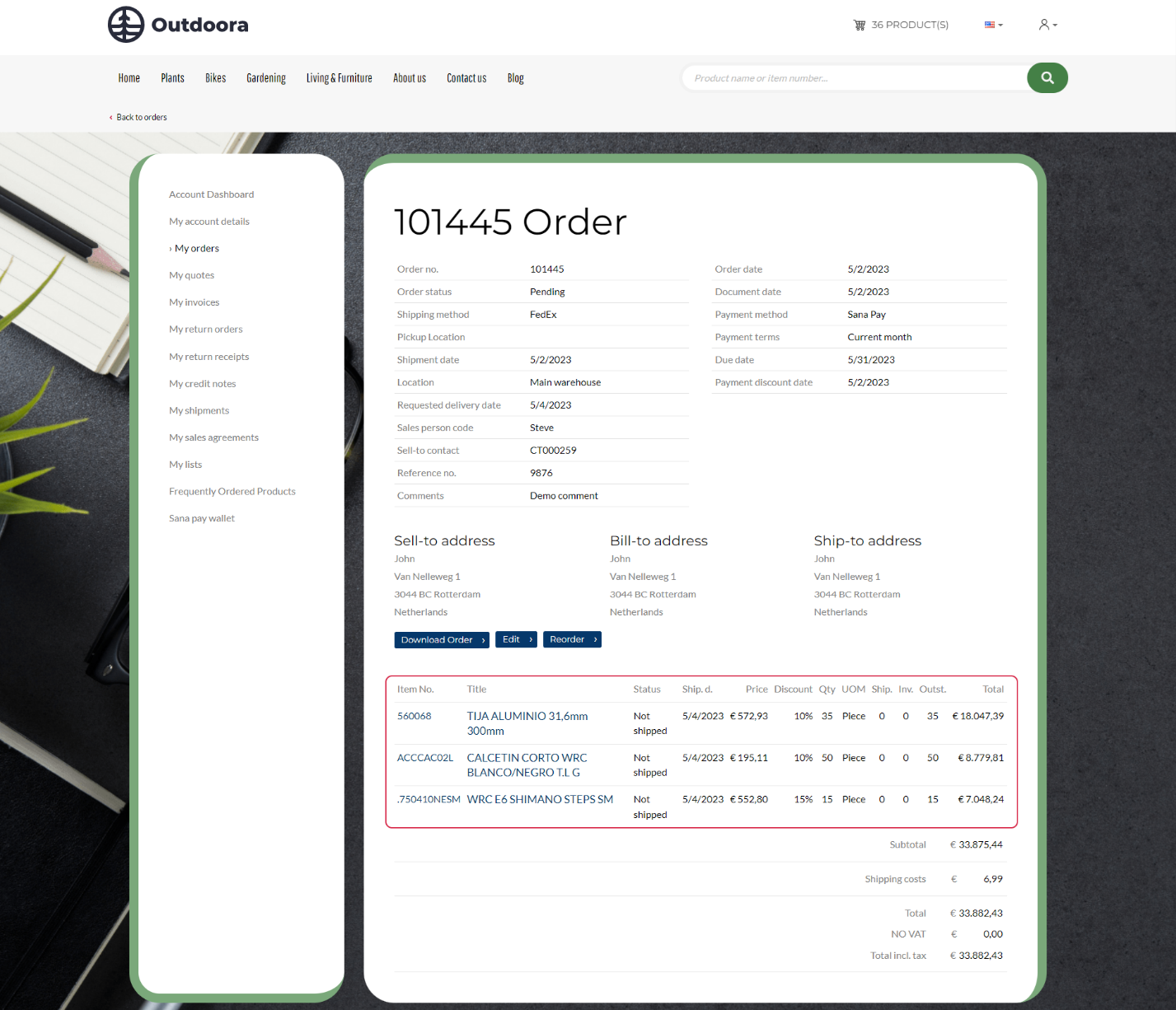
With this new Sana release for Microsoft Dynamics NAV, that has changed. Webstore administrators can now add additional ERP fields to the sales document lines, allowing them to modify the sales document details shown in the Sana webstore to better fit their business needs.
Note that this feature also requires Sana Commerce Cloud version 1.124 or later.
Data Upgrade
This feature is intended for technical users responsible for upgrading Sana Commerce Cloud in Microsoft Dynamics NAV.
We have introduced a new Run Data Upgrade action to ensure smooth data transitions when upgrading Sana Commerce Cloud in Microsoft Dynamics NAV.
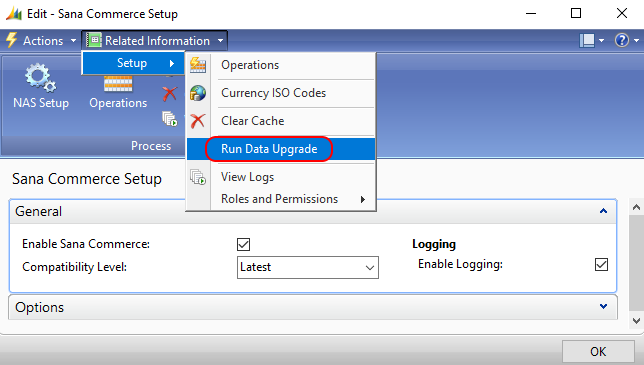
After installing a new version of Sana Commerce Cloud in Microsoft Dynamics NAV that includes structural changes to the tables, administrators can now manually trigger the Run Data Upgrade process. This allows administrators to manually upgrade existing data to match the new structure, making sure everything works as expected after the upgrade.
You only need to run this if you are skipping one or more Sana versions during the upgrade. If you are upgrading from one version to the next in sequence, the data upgrade runs automatically, and no extra steps are needed.
Other Changes
Not all releases include numerous new features, but we continually make technical improvements to enhance the Sana ERP Connector's performance, reliability, and scalability. These efforts support a stable, secure, and scalable platform for growth. Below you can see some of the improvements included in this release.
-
In Microsoft Dynamics NAV, Sana Commerce Cloud uses a background process to check the indexability of all items. It is used in the Webshop Catalog Overview by ensuring items are properly indexed. We have now included bar codes in this check to ensure they don't contain any special characters that could affect item indexing.
-
The date and time when an order is received from the Sana webstore is now displayed more accurately in the Webshop Orders Overview. This time is based on the time zone set in the User Personalization Card of the NAV user. The update addresses issues that may be caused by daylight saving time changes, ensuring the order creation time is displayed correctly.
-
We have enhanced the validation of the payment and shipping cost setup for the G/L Account type used in the webstore. In the NA database, the Gen. Bus. Posting Group and Gen. Prod. Posting Group fields may no longer be required if the VAT in Use option is disabled in the General Ledger Setup.
Bug Fixes
Below you will find a list of key bugs fixed in this release. We have not included every bug fix, focusing instead on the most critical ones.
-
Fixed an issue where unused prepayments were added to sales orders.
-
Fixed an issue where some manually entered shipping address fields during checkout were not properly returned to Sana, potentially affecting the order editing functionality.
-
Fixed an issue where removing a bar code from an item did not update the item's modification date, affecting item indexing.
-
Fixed an issue where decimal separators were not displayed in attribute values.
-
Fixed an issue where the field name was shown instead of the salesperson's actual name in the account details.
-
Fixed an issue where Mix & Match discounts were applied to fractional quantities when the whole numbers were used.
-
Fixed an issue where an auto-added item from the Mix & Match discounts appeared twice in the shopping cart when percentage-based payment costs were calculated.


