Sana Commerce Cloud 1.143
Release date: April 1, 2026
Learn about improvements and bug fixes in this release.
Not every release comes with new features, but we're always working behind the scenes to improve Sana Commerce Cloud. From boosting performance and reliability to fixing bugs and refining the user experience, each update helps make Sana Commerce Cloud better. We also include essential security updates to keep your data and our system safe. All of these improvements lay the groundwork for a stable, secure, and scalable platform. At the same time, we are working on new functionality that will be included in future releases.
What’s New?
Visual Designer Enhancements
We’ve significantly improved the visual designer in Sana Admin to make building and editing pages more intuitive, efficient, and user-friendly.
Sana’s content management system is an all-in-one page builder and visual editor that enables teams to create structured, on-brand content without requiring design or technical expertise. With this release, we’ve refined the experience to provide a cleaner, more focused workspace – helping users work faster, reduce distractions, and manage content updates with greater ease and confidence.
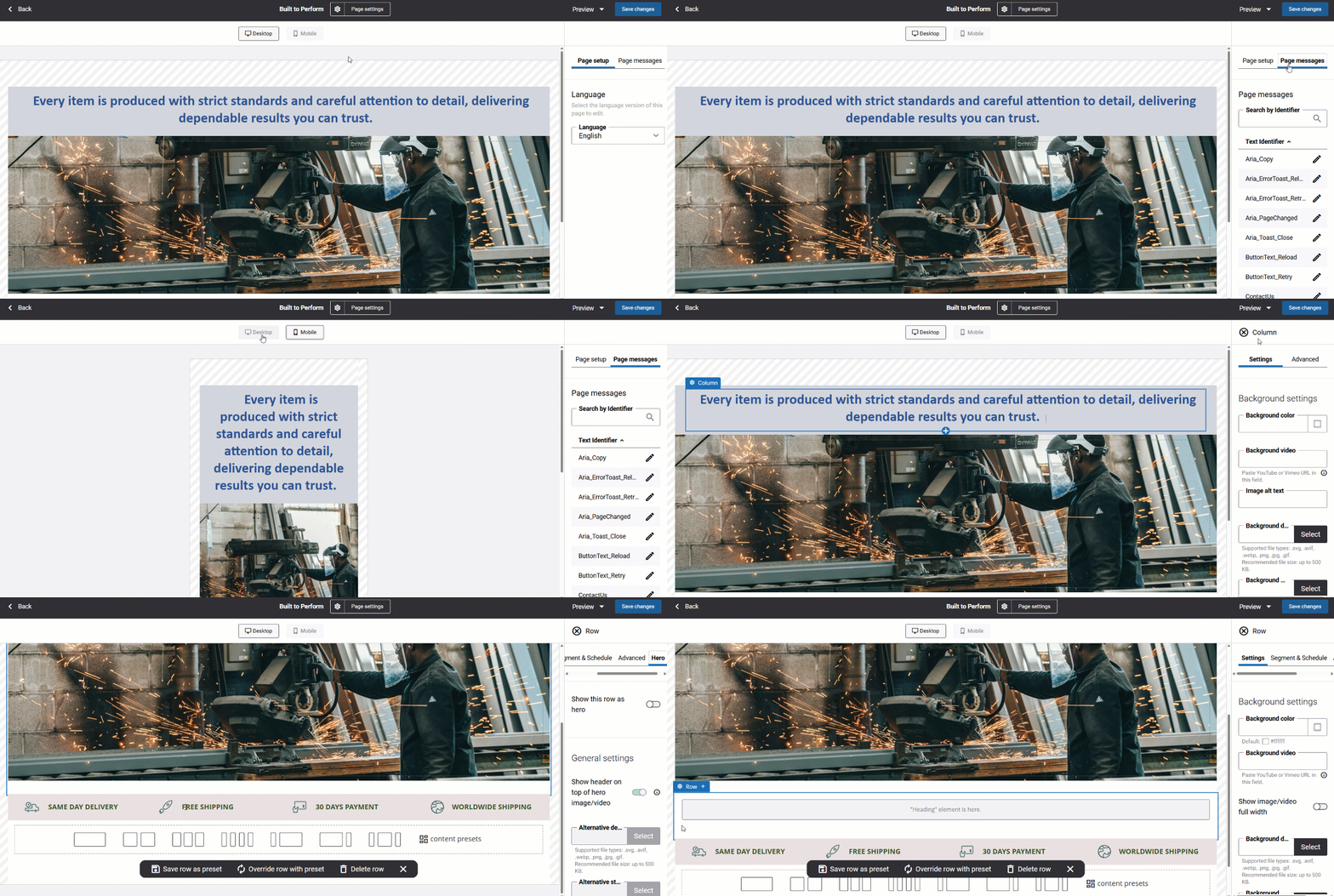
Key Updates
- When opening a page, users now land directly in the visual designer, allowing them to start editing immediately without unnecessary navigation.
- Settings such as basics, advanced, SEO, and media have been moved out of the main view. They are now accessed via the Page settings button in the toolbar.
- When no elements are selected, the left panel provides access to:
- Page messages – for editing page-level messages.
- Page setup – for configuring language, layout, and other page-specific settings.
- The Desktop and Mobile tabs have been repositioned to the top of the page, below the toolbar, and are now presented as buttons. This allows switching between desktop and mobile layouts as before, with each layout configurable independently.
- The Preview button is now located in the right toolbar for quick access.
- After saving changes, the page remains open so users can continue working without interruption.
- Adding an element opens a pop-up with the Content and Advanced tabs. Settings can be configured immediately or later. Once added, selecting the element in the visual designer displays its settings in the right panel, with changes reflected in real time.
- Selecting a row or column in the visual designer displays its settings in the right panel.
- Elements can be easily repositioned using drag-and-drop within the designer.
- Users can click to select elements, columns, or rows, and double-click to quickly switch between hierarchy levels (element → column → row).
- When an element is selected, its name and a configure button appear in the top-left corner. Clicking the button opens a dropdown with context-specific actions. Rows also include an additional add button with further options.
For more information, see Creating and Editing Webstore Pages.
Bug Fixes
One of the benefits of the minor releases on a regular basis is that you constantly receive bug fixes. Below you can see the list of some bugs that we fixed in this release. We do not add all bug fixes, but only the most important ones, since there are many technical fixes, minor design fixes, or performance-related fixes that we do not add to the release notes.
- Fixed an issue with the request to Microsoft Dynamics 365 for Finance and Operations that caused quote submission to fail when creating a quote on behalf of a prospect while using the optimized for large orders strategy.
- Fixed an issue that triggered an error when attempting to unpin the bookmark for the Sana Commerce Insights report in Sana Admin.
- Fixed an issue where the extended text for a product is not displayed in the shopping cart when the product includes a supplementary item.
- Fixed an issue with the Content indexing task that prevented it from completing.
- Fixed an issue that prevented editing location names in the multi-location stock pop-up via the in-site editor.


