Logging
Logging is used to write XML requests from Sana to Microsoft Dynamics NAV and responses from Microsoft Dynamics NAV to Sana. Sana Commerce Cloud communicates with Microsoft Dynamics NAV via Web service. You can use XML requests and responses for troubleshooting and debugging.
By default, logging is disabled as it affects performance. Therefore, it is better to use it only for debugging purposes.
In Microsoft Dynamics NAV click: Webshop > Administration > Setup.
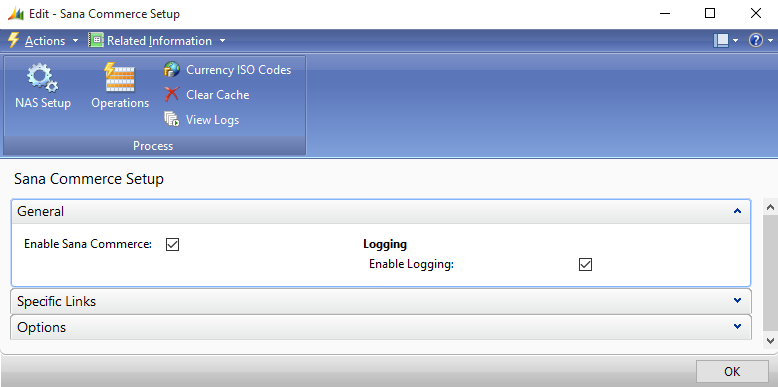
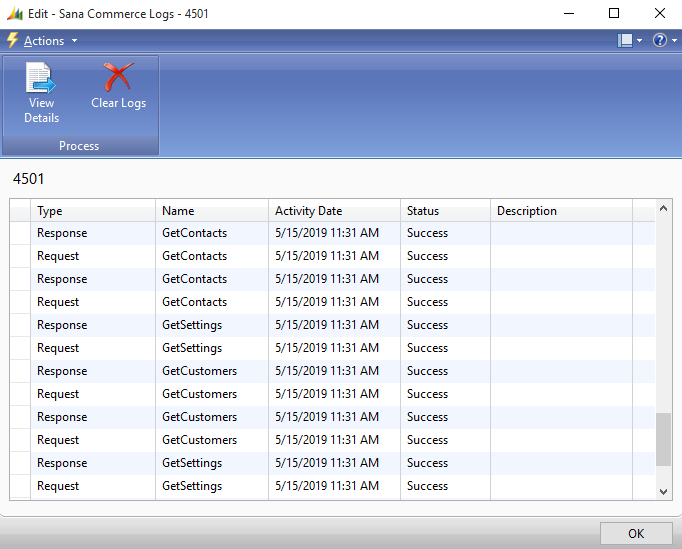
Use the Enable Logging checkbox to enable and disable logging. If logging is enabled, click View Logs to see the list of all log files, the type of each log file, request or response, its name and status. If there is an error in a response from Microsoft Dynamics NAV, the status of this log will be Failed and the error message will be shown in the Description field.
If you need to open and see the details of the log file or save it, select the necessary request or response and click View Details.
You can also process requests using Manual Process Requests for debugging purposes.
Clear Logs
Batch deletion of logs, based on specific filters and scheduled intervals, is available in Microsoft Dynamics NAV starting from Sana Commerce Cloud 10.0.141.
As mentioned earlier, logging should be enabled only when necessary and disabled when no longer needed. Prolonged use can negatively affect performance and lead to the accumulation of unnecessary data. Additionally, users may forget to turn off logging, so it is advisable to delete accumulated logs periodically.
In the Sana Commerce Logs window, click Clear Logs. You can delete either all logs or only those that match specific filters.
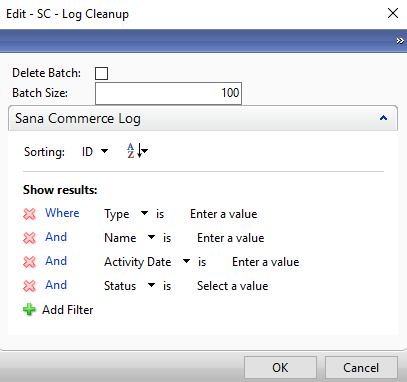
If the Delete Batch option is disabled, the system tries to delete all logs at once. Clearing many log records at once can fail when thousands of logs are present. Thus, logs can be deleted in batches, allowing you to remove records in smaller sets, for example, 100 logs at a time, if the system cannot process a full deletion at once. You can also apply filters to delete only specific logs, such as requests or responses, based on name, date, or status.
In addition, you can schedule automatic log deletion to keep the system clean and prevent log accumulation. Scheduling is available starting with Microsoft Dynamics 2013 R2.


