How Sana Sends E-Mails
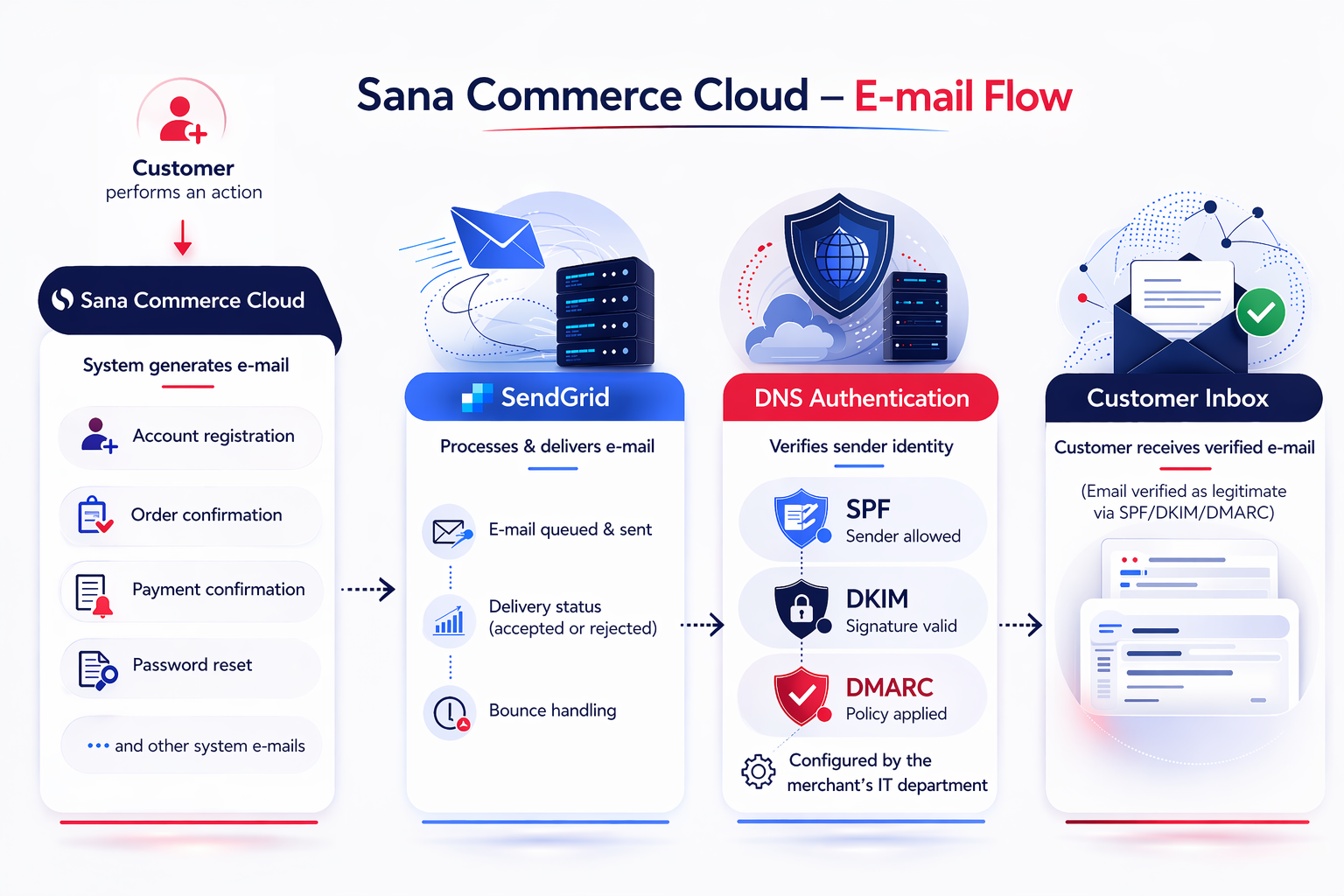
Sana Commerce Cloud relies on system e-mails – the automatic messages that are part of what keeps your business running smoothly.
When customers register online in the webstore, place orders, reset passwords, etc., the Sana webstore automatically sends e-mails. These messages are not marketing campaigns. They are operational e-mails, essential for completing transactions and maintaining customer trust.
At the same time, communication also flows in the other direction – customers may reply to order confirmations, ask questions about delivery, follow up on payment issues, etc.
In other words, your webstore relies on two types of e-mail communication:
- System e-mails sent from your webstore to customers.
- Replies sent from customers back to you.
When a customer receives an e-mail from your webstore, it reflects your brand. If e-mails are delayed, end up in spam, or look suspicious, it can hurt trust, cause confusion, and even affect sales.
Behind the scenes, these messages are not sent from your personal mailbox or company mail system. Sana Commerce Cloud sends all system e-mails through a trusted delivery system called SendGrid. Proper setup ensures that:
- E-mails reach the inbox reliably.
- They cannot be impersonated or tampered with.
- Your main company domain remains safe and your brand is protected.
To make this work properly and safely, both you, a webstore owner, and Sana Commerce, as your software vendor, must complete specific steps.
Protect Your Main Domain: Create a Subdomain
For organizations with strict corporate e-mail policies, we strongly recommend using a dedicated subdomain for webstore e-mail traffic instead of the root domain.
The merchant’s IT department must create a subdomain. It separates system e-mails sent by Sana Commerce Cloud from your corporate staff e-mails, marketing campaigns, and website reputation. It’s about isolation and safety.
Send this subdomain to your Sana Commerce representative.
Example:
- Your main domain: yourcompany.com
- Your dedicated subdomain: store.yourcompany.com
- Your webstore e-mails come from: notifications@store.yourcompany.com
Think of it like this:
- Main domain = your headquarters
- Subdomain = your shipping department
Now imagine all automated webstore e-mails going out from that same address. If something ever goes wrong, for example, spam complaints, reputation issues, or delivery problems, your main domain could be affected. That’s why we strongly recommend using a separate subdomain for system e-mails sent by Sana Commerce Cloud.
If the shipping department has an issue, your headquarters remains uncompromised.
This is a standard model used by security-conscious organizations.
Authorize SendGrid to Send for You
The Sana Commerce Cloud hosting team provides merchants with the necessary DNS records. The merchant’s IT department must add the records to its DNS zone.
This allows SendGrid to send Sana’s system e-mails from a dedicated subdomain, for example, mail.yourcompany.com. You are not giving Sana or SendGrid control over your domain. You are only granting permission to send messages from your Sana webstore to your customers on your behalf. This improves deliverability and prevents e-mails from looking suspicious.
The merchant’s IT department must configure a DomainKeys Identified Mail (DKIM), Sender Policy Framework (SPF), and Domain-Based Message Authentication Reporting and Conformance (DMARC) records for the subdomain used to send system e-mails.
With SPF + DKIM + DMARC properly configured:
- Your domain becomes much harder to abuse.
- Inbox placement improves.
- Your brand is protected at the infrastructure level.
DKIM: Digital Signature for E-Mails
Each e-mail is signed with a cryptographic signature (DKIM), allowing receiving mail servers to verify the sender and ensure the message has not been altered.
When the e-mail reaches the customer’s inbox, their e-mail provider checks:
- Was this really sent by an authorized sender?
- Was it modified along the way?
If the signature is valid, the message is trusted. If not, it ends up in spam.
You don’t manage the signature yourself. You allow SendGrid to attach it by adding the DNS records provided.
SPF: Who Is Allowed to Send E-Mails for My Webstore?
SPF defines which mail servers are authorized to send e-mails on behalf of your domain. In this case, it ensures that only SendGrid can send e-mails from the configured subdomain. With SPF, e-mail providers can see whether the sender is legitimate.
When a customer receives an e-mail from a Sana webstore, for example, from the notifications@store.yourcompany.com e-mail address, the customer’s e-mail provider checks:
- Is SendGrid allowed to send on behalf of this domain?
- Or is this message coming from an unauthorized server?
SPF helps receiving mail servers verify that the sender is authorized to send e-mails on behalf of your domain. However, it is only one of several factors used to evaluate an e-mail. Even with a valid SPF record, e-mails may still be filtered as spam depending on the recipient's mail server policies and other signals.
DMARC: Security Policy
DMARC tells e-mail providers what to do if an e-mail fails the security check: just monitor, send suspicious e-mails to spam, or completely block.
This protects your company from phishing and spoofing. Without DMARC, someone could fake your domain and send e-mails pretending to be you.
With DMARC, you control how that’s handled.
Configure Webstore E-Mail Addresses
In Sana Admin, go to: Setup > Basics > E-mail addresses.
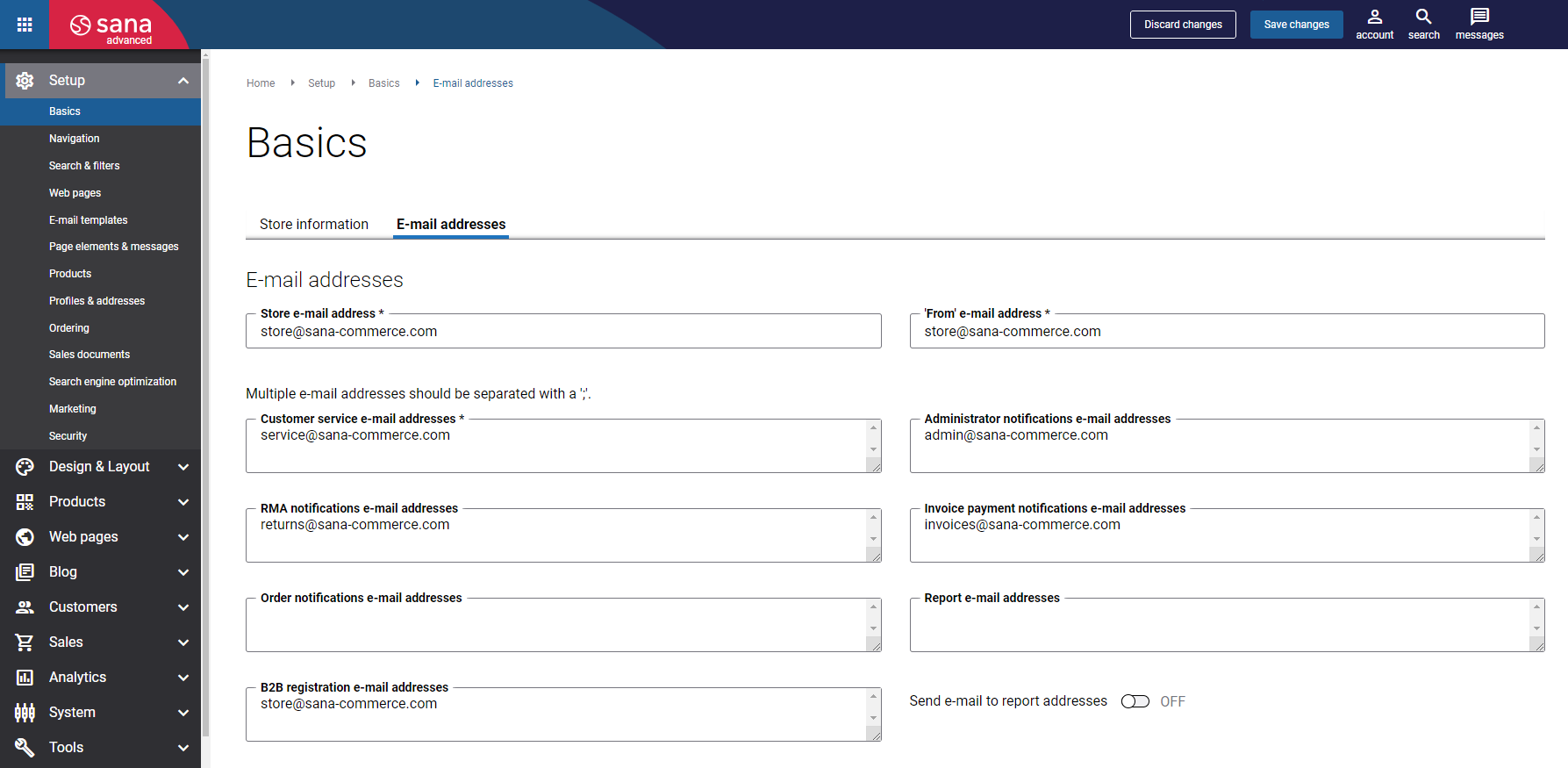
Configure the following e-mail addresses:
| E-mail address | Description |
|---|---|
| Store e-mail address | This is the e-mail address that appears in the body of the e-mails sent from your Sana webstore to customers. If the [SHOPEMAIL] tag is used in your e-mail templates, it is automatically replaced with this e-mail address.
Examples: |
| ‘From’ e-mail address | All e-mails sent from your Sana webstore to customers, such as order confirmations, come from the e-mail address specified in this field.
This e-mail address must match the authenticated subdomain described in this manual above. Examples: |
| ‘Reply-to’ e-mail address | Any system-generated e-mails from Sana that customers reply to are sent to this e-mail address.
This is your real monitored inbox. Examples: |
Use different ‘From’ and ‘Reply-to’ e-mail addresses because automated sending and human communication should not be mixed. This keeps your internal e-mail system clean and protected.
For more information, see E-Mail Addresses.
Why Sana Does Not Support External SMTP
Sana Commerce Cloud does not support sending system e-mails through external SMTP servers, including:
- Microsoft 365 SMTP relay
- Customer-managed mail servers
- OAuth-authenticated service accounts
- Any other third-party SMTP infrastructure
All system e-mails are sent through Sana’s managed e-mail delivery infrastructure.
Reasons for this implementation:
-
Sana Commerce Cloud architecture: The e-mail delivery system is tightly integrated with Sana’s internal queueing and processing architecture. This allows Sana Commerce Cloud to reliably generate, queue, and deliver system e-mails as part of core workflows such as order confirmations, password resets, and system notifications. Introducing external SMTP servers would break this tightly controlled delivery pipeline and introduce unpredictable dependencies.
-
Reliability and message safety: Using external SMTP relays increases the risk of e-mail delivery failures during connectivity issues, authentication problems, or rate-limiting by third-party servers. By using a managed delivery infrastructure, Sana Commerce Cloud can ensure reliable message processing and reduce the risk of lost or delayed e-mails.
-
Supportability: Allowing custom SMTP configurations would significantly increase troubleshooting complexity. Issues related to external mail servers, authentication mechanisms, firewall restrictions, or provider policies would fall outside the platform’s control, making it more difficult to provide consistent support.
-
Platform consistency: A standardized e-mail delivery infrastructure ensures consistent behavior across all Sana webstores. This approach simplifies Sana Commerce Cloud updates, security improvements, and infrastructure maintenance while maintaining predictable e-mail delivery performance.
Proper e-mail configuration is essential for ensuring that system e-mails from your Sana webstore are delivered reliably and securely to your customers. By authorizing Sana’s e-mail delivery infrastructure and correctly configuring DNS records such as DKIM, SPF, and DMARC, merchants can protect their domain, improve e-mail deliverability, and maintain customer trust. Following the recommended configuration also ensures that system e-mails, such as account registrations, order confirmations, password resets, etc., are sent in a consistent and secure manner.


