Create AIF Service
Step 1: In Microsoft Dynamics AX go to the following location: System administration > Setup > Services and Application Integration Framework > Inbound ports.
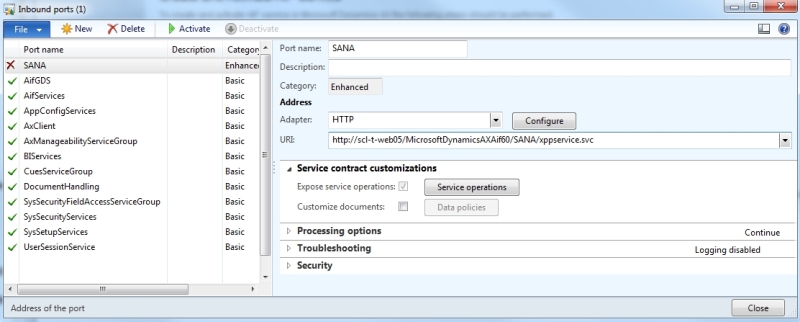
Step 2: Create new inbound port:
- Specify port name (e.g. SANA);
- Select HTTP in the Adapter dropdown;
- Select website in the URI dropdown (this website was created during installation of web services on IIS);
- Open the Application Object Tree (Ctrl + D) and expand the Services section. Right-click on the SC_AXDataServiceClient service and select Add-Ins and then click Register service.
- In the Inbound ports form, expand the Service contract customizations section, click on the Service operations button and move SC_AXDataServiceClient.ProcessRequest service operation from the right column to the left:

Microsoft Dynamics AX 2012 R2 enables data isolation by using data partitions.
Thus, if you are using Microsoft Dynamics AX 2012 R2, before activating the AIF service, on the Security FastTab, you can use the Restrict to partition field to select the partition to which inbound requests that are handled through the port should be limited.


